Developer forum

Forum » Development » Custom URL provider

Custom URL provider

Adrian Ursu Dynamicweb Employee
Adrian Ursu
Reply

Hi guys,
I am trying to build a dedicated URL provider for a specific QueryString parameters. It should work similar to how GroupID and ProductID works, meaning that I will have a QueryParameter controlling the path and another one controlling the Detail.
My approach was to build a new URL provider that would be selectable at page level:
image.png
My first objective was to create the path based on DiagramCategoryId. Something like this: /Default.aspx?ID=8452&DiagramCategoryId=15 that would turn into something like this: /en-us/testurlprovider/test

In logs, I have seen that the function GetUrlDataNodes is called with success, resulting in one node that is returned.

This is the list of nodes from the log returned by the GetUrlDataNodes function:

[ { "Id": "CMGT_CATEGORY_15_8452", "ParentId": "8452", "AreaId": 0, "PathName": "test", "IgnoreInChildPath": false, "IgnoreParentPath": false, "IncludeInSitemapXml": true, "Hidden": false, "ActiveFrom": "0001-01-01T00:00:00", "ActiveTo": "0001-01-01T00:00:00", "PathExact": "", "QueryStringParameter": "DiagramCategoryId", "QueryStringValue": "15", "QueryStringExact": "", "IgnoreParentQuerystring": false, "ProviderTypeName": null, "ProviderParameters": null } ]

Here is my code:

[AddInName("ExplodedDiagrams")]
 
public class ExplodedDiagramsUrlDataProvider : UrlDataProvider, IParameterOptions, IParameterVisibility
{
    public override IEnumerable<UrlDataNode> GetUrlDataNodes(UrlDataNode parent, UrlDataContext dataContext)
    {
        LogManager.System.GetLogger(LogCategory.Health,"CmgtExploadedDiagrams").Info($"GetUrlDataNodes start!");
 
        var nodes = new List<UrlDataNode>();
        var categories = GetTopCategories();
        if (categories is null)
        {
            return nodes;
        }
 
        var settings = GetUrlDataSettings();
        foreach (DiagramCategory category in categories)
            AddNodesRecursive(nodes, parent, category, settings);
 
        LogManager.System.GetLogger(LogCategory.Health,"CmgtExploadedDiagrams").Info($"GetUrlDataNodes finished!");
        LogManager.System.GetLogger(LogCategory.Health,"CmgtExploadedDiagrams").Info($"GetUrlDataNodes finished {DfCustom.ToJson(nodes, Newtonsoft.Json.Formatting.Indented)}!");
 
        return nodes;
    }
 
    private UrlDataSettings GetUrlDataSettings()
    {
        var settings = new UrlDataSettings();
        settings.IncludeDiagrams = false;
        return settings;
    }
 
    private static List<DiagramCategory> GetTopCategories()
    {
        return Services.Diagrams.GetTopLevelCategories().ToList();
    }
 
    private void AddNodesRecursive(IList<UrlDataNode> entries, UrlDataNode parent, DiagramCategory category, UrlDataSettings settings)
    {
        var groupUrlData = CreateGroupUrlData(parent, category);
        entries.Add(groupUrlData);
        IEnumerable<DiagramCategory> subGroups = GetSubGroups(category);
        foreach (DiagramCategory subCategory in subGroups)
            AddNodesRecursive(entries, groupUrlData, subCategory, settings);
    }
 
    private static UrlDataNode CreateGroupUrlData(UrlDataNode parent, DiagramCategory group)
    {
        var nodeData = new UrlDataNode()
        {
            Id = $"CMGT_CATEGORY_{group.Id}_{parent.Id}",
            ParentId = parent.Id,
            PathName = group.Name,
            IgnoreInChildPath = false,
            IgnoreParentPath = false,
            PathExact = string.Empty,
            QueryStringParameter = "DiagramCategoryId",
            QueryStringValue = group.Id.ToString(),
            QueryStringExact = string.Empty,
            IgnoreParentQuerystring = false,
            IncludeInSitemapXml = true,
        };
 
        return nodeData;
    }
 
    private static List<DiagramCategory> GetSubGroups(DiagramCategory group)
    {
        return Services.Diagrams.GetChildCategories(group.Id).ToList();
    }
 
    #region IParameterOptions, IParameterVisibility, IParameterSectionVisibility
 
    IEnumerable<ParameterOption> IParameterOptions.GetParameterOptions(string dropdownName)
    {
        var options = new List<ParameterOption>();
        switch (dropdownName ?? "")
        { }
        return options;
    }
 
    IEnumerable<string> IParameterVisibility.GetHiddenParameterNames(string parameterName, object parameterValue)
    {
        var parameters = new List<string>();
        switch (parameterName)
        { }
        return parameters;
    }
 
    #endregion
 
    private class UrlDataSettings
    {
        public bool IncludeDiagrams
        {
            get; set;
        } = false;
    }
}

Is this the right direction? What am I doing wrong?

Adrian 


Replies

 
Nicolai Pedersen Dynamicweb Employee
Nicolai Pedersen
Reply

Hi Adrian,

Your approach is correct --- the GetUrlDataNodes method returning nodes with the right structure is exactly the right foundation.

Looking at your node, I can spot one likely issue: the QueryStringParameter should be "ID" (the page ID), not "DiagramCategoryId".

The way the URL provider system works:

  • The page node (parent) already carries ID=8452 as its page identifier.
  • Your provider's nodes should map DiagramCategoryId by setting QueryStringParameter = "DiagramCategoryId" and QueryStringValue = "15" --- but the resulting URL will append that to the parent page's own query string, not replace the page ID.

So your node as returned looks correct for adding the DiagramCategoryId=15 segment. The full resolved URL for a node would be /en-us/testurlprovider/test?ID=8452&DiagramCategoryId=15 --- the ID comes from the page, and your node adds the DiagramCategoryId on top.

What to verify:

  1. ParentId must match the parent node's Id exactly. The parent argument passed into GetUrlDataNodes is the page-level node. Your child nodes' ParentId should be set to parent.Id.

    new UrlDataNode
    {
        Id = $"CMGT_CATEGORY_{category.DiagramCategoryId}_{parent.Id}",
        ParentId = parent.Id,   // <-- this is critical
        PathName = category.UrlName,
        QueryStringParameter = "DiagramCategoryId",
        QueryStringValue = category.DiagramCategoryId.ToString(),
        IncludeInSitemapXml = true,
        QueryStringExact = string.Empty,
        PathExact = string.Empty
    }
    
  2. The provider must be selected on the correct page in the backend. The page at /en-us/testurlprovider (ID=8452) must have your provider selected as its URL Data Provider. The provider is discovered automatically by the AddIn system --- no manual registration needed --- as long as the class has the [AddInName("...")] attribute and is in an assembly that Dynamicweb loads.

  3. PathExact and QueryStringExact should be set to string.Empty, not left as null. Look at ShopUrlDataProvider.CreateGroupUrlData for reference --- it explicitly sets both to empty string.

  4. Cache invalidation: The URL index is built once and cached. After making changes, clear the URL cache or trigger a rebuild (in the backend under Settings → URLs, or restart the site) to see your nodes take effect.

If the URLs still don't resolve after confirming the above, enable URL rewrite logging (if available) or add a temporary breakpoint/log in UrlPageTreeHelper around line 154 to confirm your provider is being instantiated and your nodes are being added to the tree.

Hope that helps!

 
Adrian Ursu Dynamicweb Employee
Adrian Ursu
Reply

Thank you very much, Nicolai!
Will give it a try and get back.

Thank you,

Adrian

 
Adrian Ursu Dynamicweb Employee
Adrian Ursu
Reply

Hi Nicolai,
I believe I made some progress, meaning that I got to the point where the friendly URL is recognized (does not render 404), but it does not turn the raw URL into a friendly URL automatically.
It seems that I am missing something.

Adrian

 
Adrian Ursu Dynamicweb Employee
Adrian Ursu
Reply

One more thing,
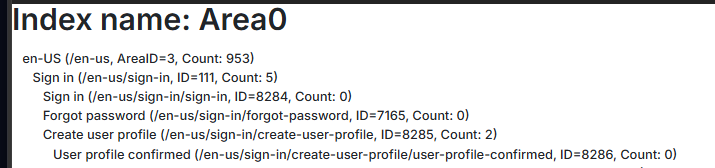
The url Index has the Urls but there is a weird Area 0 when listing it (using &showurlindex=true on the page with the Custom URL provider):
image.png

image.png
Could this be an issue for the redirect?

Thank you,
Adrian

 
Adrian Ursu Dynamicweb Employee
Adrian Ursu
Reply

Hi Nicolai,
Any suggestions for this issue?
Thank you,
Adrian

 
Nicolai Pedersen Dynamicweb Employee
Nicolai Pedersen
Reply

Area0 is when you have one urlindex - when not setting one of the 2 options below


To force the redirect ensure these are set:


Adrian Ursu Dynamicweb Employee
Adrian Ursu
Reply
I have all those options set (DW10)
 
 
It still does not redirect. Apart from registering the URL's do I need to create any kind of middleware/pipeline redirect?
I believe I am a bit confused about the first part of your first response:
You say this: "..Looking at your node, I can spot one likely issue: the QueryStringParameter should be "ID" (the page ID), not "DiagramCategoryId"..."
Then this: "
Your provider's nodes should map DiagramCategoryId by setting QueryStringParameter = "DiagramCategoryId" and QueryStringValue = "15" --- but the resulting URL will append that to the parent page's own query string, not replace the page ID."
Maybe I am registering it wrongly. I tried adding ID directly, but then the friendly URL translated into AreaID=3&DiagramCategoryId=15 instead of Id=8265&DiagramCategoryId=15

Thank you,
Adrian


You must be logged in to post in the forum